
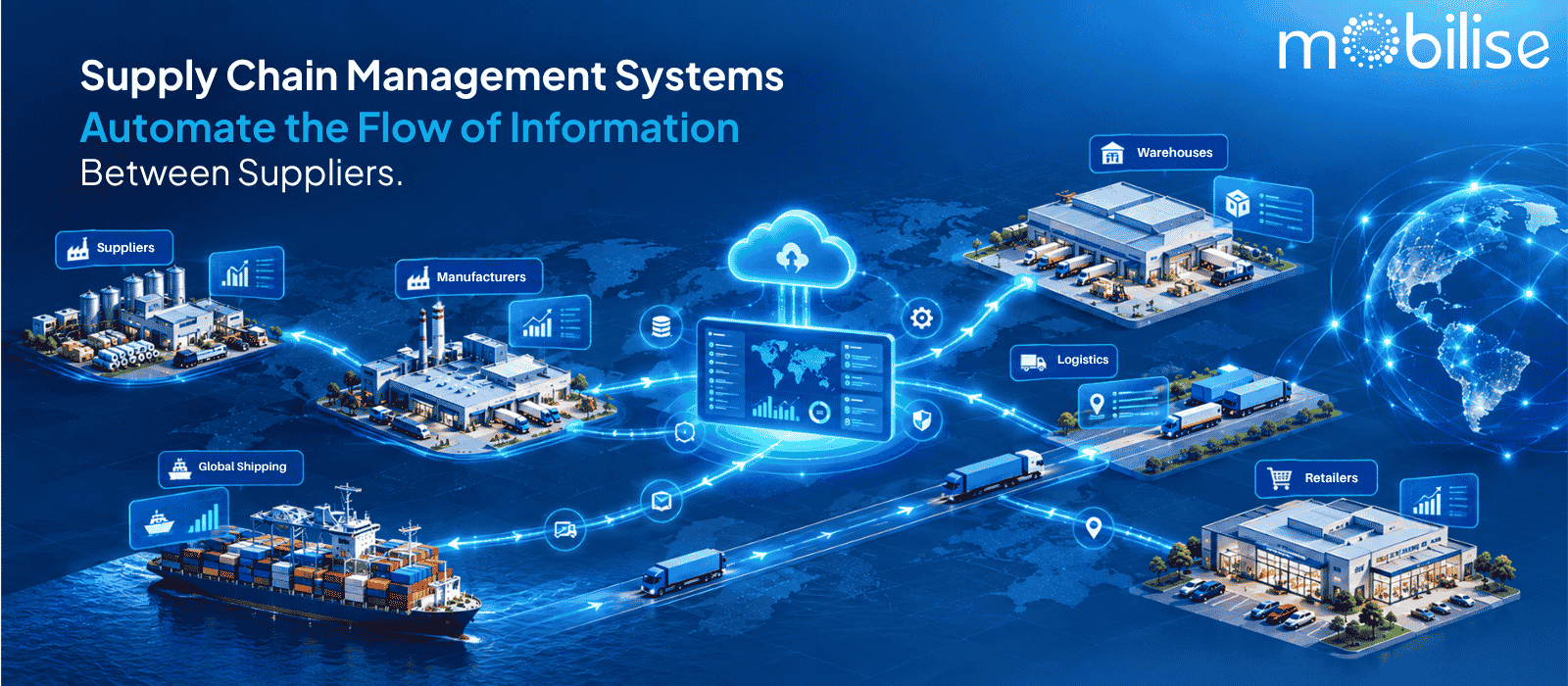
One purchase order may go through several inboxes, a spreadsheet and two follow-up phone calls before a supplier acknowledges it. Do that with dozens of vendors, warehouses and delivery partners and information starts to get out of sync with reality: stock counts stale, delivery dates get double-typed, someone forwards the wrong rate sheet. That is the problem SCM systems are designed to solve in practice. Essentially, supply chain management systems automate the flow of information between suppliers, manufacturers, distributors, retailers, logistics providers, customers and internal departments so everyone is working from the same data instead of chasing updates manually. This article breaks down exactly who that information moves between, what it contains and how automation and integration make it happen.
What Is a Supply Chain Management System?
Supply chain management systems are software that link the people, processes and data involved in moving products from raw material to the end customer. It tracks orders, inventory, suppliers, production and logistics in one place and automates the exchange of information between everyone involved so decisions run on current data rather than outdated reports.
How Does a Supply Chain Management System Work?
It works by capturing an event – a new order, a shipment, a stock level crossing a reorder point – and pushing that event to every system and person who needs it. Rather than having a warehouse manager send an email with a revised spreadsheet, the system updates the record once and every connected module picks it up right away.
What Problems Does an SCM System Solve?
Spaghetti communication of email and spreadsheets. Duplicate data entry by departments. Stock and order status insight is delayed. Purchase order approvals in someone’s inbox. And, generally, the time lag between something happening in the supply chain and the right person finding out about it.
Supply Chain Management System vs SCM Software
The term “SCM system” is usually used to refer to the whole approach, the processes, roles and technology working together. SCM software runs it. Teams use the terms supply chain management software, supply chain software, and SCM software interchangeably to refer to the platform automating procurement, inventory, vendor, and logistics information across the supply chain in practice.
Supply Chain Management Systems Automate the Flow of Information Between Which Parties?
The specific parties will depend on the structure of a supply chain, but most SCM systems automate the flow of information across four broad relationships.
Suppliers and Manufacturers
Automated flow of purchase orders, material availability, delivery schedules and supplier confirmations between procurement teams and suppliers. When a manufacturer raises a purchase order, the supplier receives it without a phone call and confirmations, dispatch dates and partial deliveries update the same record rather than a separate email thread.
Manufacturers and Distributors
Production status, finished-goods availability, shipment information and replenishment requirements flow from the factory floor to distribution partners, so distributors know what is ready to ship and when, instead of requesting a manual status update.
Distributors, Retailers and Customers
Product availability, orders, replenishment triggers, delivery information and order status link distributors to retailers and, in direct-to-customer models, to customers themselves. A stock-out or delay can be seen upstream before it becomes a customer complaint.
Internal Supply Chain Teams
Within one organization, all procurement, sales, warehouse, production, logistics, finance and customer service alike use the same order and inventory data. Where the biggest information gaps actually sit is that each department has its own version of the truth. An SCM system takes this away.
What Information Flows Through a Supply Chain Management System?
Order and Purchase Information
Purchase requisitions, purchase orders, order confirmations and approval status, so every party knows what has been ordered, approved and confirmed without checking multiple threads.
Inventory and Product Information
Stock levels, reorder points, SKU and batch data, and warehouse location – maintained in real-time as items come and go, not reconciled at the end of a month.
Supplier and Production Information
Vendor performance history, lead times, production schedules and material consumption. Connecting what is being made to what is being bought.
Shipping and Delivery Information
Instead of calling a logistics partner for an update, check the status of in-transit shipments and proof of delivery and dispatch.
Demand and Forecast Information
forecast vs actual data, seasonal patterns, historical demand to plan procurement and production ahead of need instead of reacting after a stock-out.
How Supply Chain Automation Improves Information Flow
The manual version of information flow looks something like this: email, spreadsheet, manual entry, follow-up call, update – hopefully before the information goes stale. Supply chain automation takes that chain and turns it into an event, a system update, a workflow trigger, a notification, all in one pass.
Automating Data Entry and Updates
A single event, like a goods receipt, updates inventory, triggers a vendor payment workflow and closes the related purchase order, and eliminates the need for anyone to re-key the same numbers three times.
Automating Purchase Orders and Approvals
Requisitions are automatically sent to the correct approver based on value or category and once approved, generate the purchase order and send it to the supplier without manual drafting.
Automated Inventory Alerts
Instead of waiting for someone to see the low shelf, stock crossing a reorder threshold gives an alert or an automatic replenishment request.
Automated Supplier Communication
The system itself sends order confirmations, delivery schedule changes and shipment updates to suppliers and buyers, eliminating the email back-and-forth that normally causes delays.
Automated Shipment and Delivery Updates
Dispatch and transit events are used to update the order record directly, so downstream teams can see delivery status without having to contact the logistics provider.
How SCM Software Improves Supply Chain Visibility
Real-Time Inventory Visibility
Stock levels tell you what you have, where you have it, when a transaction takes place — not what you had, where you had it, at last week’s manual count.
Order and Shipment Visibility
Anyone who has access to it can see where an order is located, raised, dispatched, delivered without having to contact the department that deals with that stage.
Supplier Visibility
Delivery performance, quality issues and lead time trends are visible over time and not known only anecdotally to whoever deals with that vendor.
Centralised Supply Chain Dashboards
By bringing together order, inventory, supplier and shipment data on one dashboard, teams can see how the supply chain is actually performing, rather than piecing it together from separate reports.
How Supply Chain Management Software Connects Business Systems
Supply chain information is seldom centralised. It straddles accounting, warehouse operations, transportation, and supplier portals. The job of SCM software is to link those systems so that information doesn’t have to be copied from one to another manually.
ERP Integration
With SCM data linked to ERP, records such as financial, procurement, and inventory remain consistent. This means a purchase order and invoice refer to the same numbers automatically.
Warehouse and Transportation System Integration
Integration with warehouse management and transportation systems means that stock movements and shipment status update the central order record, without a separate manual reconciliation step.
Supplier and Customer System Integration
When suppliers or customers have their own systems, integration allows order and delivery data to flow through directly, reducing the re-keying that normally occurs at each handover.
API, EDI and IoT Integration
APIs and EDI link different software platforms so they can share order and shipment information in a standard format. IoT sensors on equipment or shipments can feed real-time location or condition data into the same system, without a person keying it in.
Key Features of Supply Chain Management Software
- Inventory management
- Procurement management
- Supplier management
- Order management
- Warehouse management
- Transportation management
- Demand forecasting
- Real-time tracking
- Automated workflows
- Alerts and notifications
- Analytics and reporting
Each of these exists to support one of four things: moving information faster, automating a manual step, improving visibility, or coordinating multiple parties in the supply chain.
Benefits of Automating Supply Chain Information Flow
Faster Information Sharing
Updates get to the right person when something happens, not when someone remembers to send it.
Fewer Manual Errors
By eliminating the need for repeated manual entry, you reduce the typing and copy-paste errors that cause mismatched records.
Better Inventory Control
Knowing what is in stock now allows for more accurate reordering and helps prevent stock-outs and overstocking.
Improved Supply Chain Visibility
Teams know what’s going on with suppliers, warehouses and shipments, rather than just getting status updates.
Faster Decision-Making
With the data we have we can make faster decisions on reordering, supplier problems or delivery delays.
Better Supplier Coordination
Real-time shared order and delivery data eliminates much of the back-and-forth needed to confirm status with suppliers.
Supply Chain Management in India
Managing Multiple Suppliers and Locations
Running multiple sites with suppliers in different states makes centralised information flow more valuable for many Indian enterprises, from hospital chains to manufacturing groups, than for a single-location business.
Improving Inventory and Logistics Visibility
Businesses that have stock in multiple warehouses or branches benefit from having real-time visibility, as opposed to having to manually reconcile stock across sites on an ad-hoc basis.
Coordinating Vendors and Distributors
Organisations that have regional distributors and multiple vendors need a consistent way to track purchase orders, deliveries and vendor performance across all of them.
Supporting Growing Indian Businesses
As Indian enterprises grow and add locations, manually tracking the supply chain through spreadsheets becomes difficult to sustain. This is where a connected SCM system becomes a practical necessity and not an option.
Manual vs Automated Supply Chain Information Flow
But speed is more than an operational dimension. Manual processes rely on someone remembering to update a record and someone else remembering to check it. That dependency is removed when automated systems are used . So information remains current whether a particular person is watching it or not .
How to Choose the Right Supply Chain Management Software
Identify Your Supply Chain Requirements
Procurement, inventory, logistics, vendor management – map out what processes really need automation before evaluating software.
Check Integration Capabilities
Ensure the software can connect with your existing ERP, warehouse and accounting systems – not just function as a standalone tool.
Evaluate Automation Features
Look for automated purchase orders, inventory alerts and workflow approvals not just digital versions of manual forms.”
Check Supply Chain Visibility
Find out if the software provides real-time dashboards for inventory, orders and suppliers or only static reports.
Consider Scalability
Verify that the platform allows you to add locations, vendors, or modules as the business grows, without the need to purchase a new system.
Evaluate Reporting and Analytics
Check the software provides strong reporting on supplier performance, inventory trends and order cycles.
Review Security and User Access
Verify data hosting, certifications, and role-based control of access, particularly if multiple departments or external vendors will be using the system.
Consider Implementation and Support
Consider training, onboarding time and ongoing support; a system that is difficult to adopt won’t deliver the information-flow benefits on paper.
The right SCM software for you depends on the complexity, scale and existing systems of your supply chain. None of those options are the best.
When enterprises look at this in terms of facility, asset and supply chain operations combined, rather than as separate tools, they sometimes look at platforms like OpsSuite, where procurement, inventory and vendor tracking live alongside vendor management and asset operations on one system, so supply chain data doesn’t remain siloed from facility and maintenance data.
Conclusion
Supply chain management systems automate the flow of information between suppliers, manufacturers, distributors, retailers, logistics partners, customers, and internal teams, replacing manual updates with connected, real-time data. But automation only helps to increase visibility, reduce errors and accelerate decisions if the software actually connects to the systems already in place. Picking the right SCM software isn’t about a standard feature list, it’s about your supply chain’s real needs, so consider what your integration needs are, the scale, and the visibility your teams really need right now.


